
Introduction:
In this tutorial, we will see how to restrict the Map bounds in Google Maps.
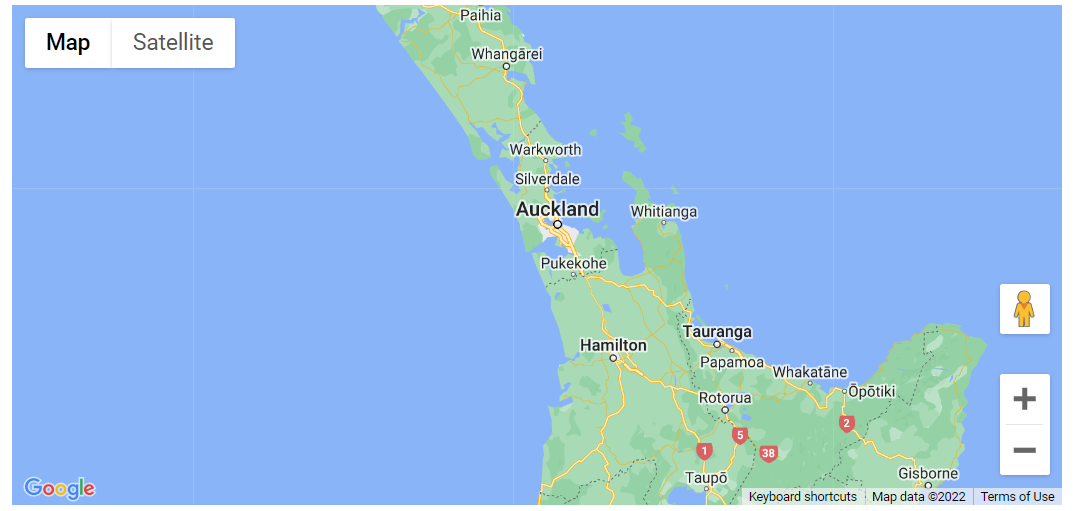
This example generates a map beginning in Auckland, New Zealand. The map only shows New Zealand. The user may move away from Auckland and explore other New Zealand cities, but they cannot pan or zoom beyond the map’s boundaries.
Code:
let map: google.maps.Map;

const NEW_ZEALAND_BOUNDS = {
  north: -34.36,
  south: -47.35,
  west: 166.28,
  east: -175.81,
};
const AUCKLAND = { lat: -37.06, lng: 174.58 };

function initMap(): void {
  map = new google.maps.Map(document.getElementById("map") as HTMLElement, {
    center: AUCKLAND,
    restriction: {
      latLngBounds: NEW_ZEALAND_BOUNDS,
      strictBounds: false,
    },
    zoom: 7,
  });
}

declare global {
  interface Window {
    initMap: () => void;
  }
}
window.initMap = initMap;
export {};
Explanation:
- The new variable named NEW_ZEALAND_BOUNDS is created with sets the noreth, east, west and south bounds.
const NEW_ZEALAND_BOUNDS = {
  north: -34.36,
  south: -47.35,
  west: 166.28,
  east: -175.81,
};
- Next the AUCKLAND variable stores the longitude and the latitude coordinates of the map.
const AUCKLAND = { lat: -37.06, lng: 174.58 };
- The function initMap() is created and it consists of the map properties.
- The line, “map = new google.maps.Map(document.getElementById(“map”)”; creates a new map inside the <div> element with the help of the mentioned id which is ‘map’ as an HTMLElement.
map = new google.maps.Map(document.getElementById("map") as HTMLElement,
- The ‘centre’ attribute defines where the map should be centered with the help of the latitude and longitude coordinates and is set to AUCKLAND.
center: AUCKLAND,
- The ‘zoom’ attribute specifies the map’s zoom level.
zoom: 7,
- Restriction is defined which is set to NEW_ZEALAND_BOUNDS.
- strictBounds is set to False.
restriction: {
      latLngBounds: NEW_ZEALAND_BOUNDS,
      strictBounds: false,
    },
- Lastly, the function is called and executed.
window.initMap = initMap;
Conclusion:
In this tutorial, we learned how to restrict the map to the specific Map Bounds.

Recent Posts
Loading recent posts...