
Introduction:
This tutorial will help you learn about the basics of Google Maps. The simple map is created using JavaScript mentioning the longitude and the latitude of the required area.
Code:
let map: google.maps.Map;

function initMap(): void {
  map = new google.maps.Map(document.getElementById("map") as HTMLElement, {
    center: { lat: -34.397, lng: 150.644 },
    zoom: 8,
  });
}

declare global {
  interface Window {
    initMap: () => void;
  }
}
window.initMap = initMap;
export {};
Explanation:
- This example creates a map that’s centered on Sydney, New South Wales, Australia.
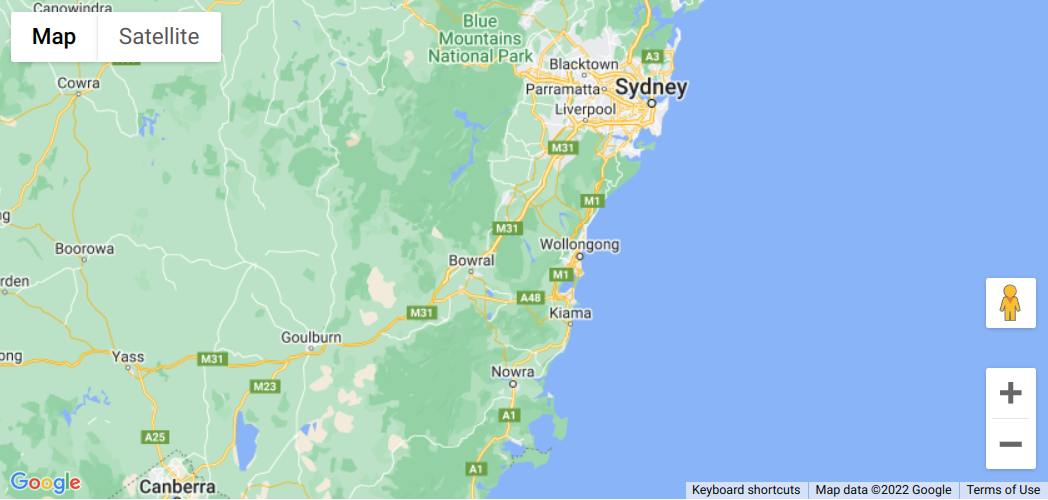
Sample Google Maps Code - The first line of the code i.e., Object.defineProperty(exports, “__esModule”, { value: true }); helps to correctly import a default export in CommonJS/AMD/UMD module format.
- The variable ‘map’ defines the properties of the map.
let map: google.maps.Map;
- The function initMap() is created to set the map properties.
- The line below line creates a new map inside the <div> element with the help of the mentioned id which is ‘map’ along with the passed parameters i.e., ‘map.’
map = new google.maps.Map(document.getElementById("map") - The ‘centre’ attribute defines where the map should be centered with the help of the latitude and longitude coordinates).
center: { lat: -34.397, lng: 150.644 } - The ‘zoom’ attribute specifies the map’s zoom level.
zoom: 8
Note: The initMap is a callback function; it’s the function that will be executed after the Google Maps API Asynchronous Script loads.
window.initMap = initMap;
Conclusion:
This example creates a map that’s centered on Sydney, New South Wales, Australia. Thus, by changing the longitude and latitude of the coordinates you can get any area’s map.

Recent Posts
Loading recent posts...