
Create a Shopping Mall Directory Map in WordPress
Display all shops, food courts, kiosks, and services in your mall with interactive filtering and navigation.
Explore Live Directory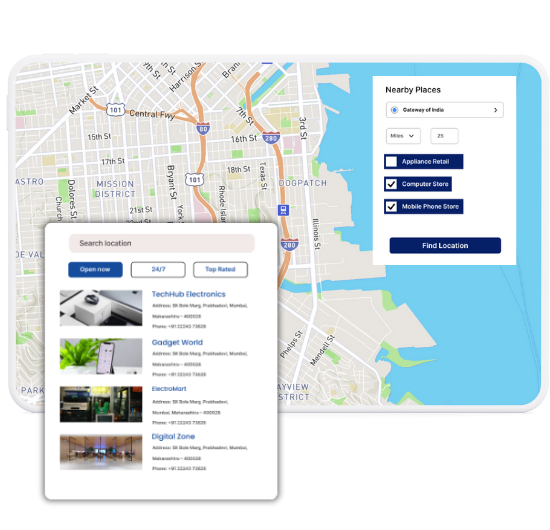
What Makes WP Maps Pro Ideal for Malls
Our WordPress map plugin offers powerful, flexible, and highly customizable features.
Category-Based Filtering
Allow visitors to search for stores, food outlets, services, and amenities by type.
Indoor-Friendly Map Layout
Visualize the structure of your mall with accurate location pins and categories.
Custom Icons for Stores
Use different icons for clothing, food, electronics, salons, etc.
Quick Direction Links
Help customers reach their favorite shop without confusion using built-in routing.
Mobile Optimized Directory
Easily accessible on any screen size — perfect for on-the-go shoppers.
Highlight Store Offers
Use custom fields or infowindows to show active deals or events per shop.
Multilingual Compatible
Translate map text and filters into any language for tourist-friendly access.
CSV Import Support
Upload and manage 100s of stores quickly with Excel/CSV support.
Works with Elementor & Gutenberg
Embed maps seamlessly using your preferred WordPress builder.
Why Choose WP Maps Pro?
Whether you manage a local shopping center or a national chain of malls, WP Maps Pro can help you create an intuitive digital directory. Help users find what they need with easy navigation, filters, and business details at their fingertips.
- Filter shops by categories like fashion, food, electronics, and more
- Include store images, timings, phone numbers, and directions
- Show current deals and ongoing events on the map
- Fully responsive layout for mobile shoppers
- Add indoor map styles for floor-wise navigation
- Works with any WordPress page builder
- Geolocation support to auto-locate mall visitors
- Use custom icons to distinguish store types
- Add amenities like restrooms, ATMs, elevators
- Multilingual support for diverse audiences
- Shortcode ready and optimized for SEO
- Built-in analytics compatibility for visit tracking
Live Map Demo
How to Use WP Maps Pro
Follow these simple steps to get started.
Upload Store Data
Use the CSV importer to add stores with categories, location, hours, and contact info.
Design Your Directory Map
Style your map to match the mall layout and define zoom, icon themes, and filters.
Assign Stores to Map
Link each store location and assign to its respective category for proper filtering.
Add Map to Your Directory Page
Use the shortcode block to place the map in any WordPress page or directory section.
Frequently Asked Questions
Find answers to common questions about Store Locator Plus
Yes! You can define store categories and assign each store to one or more filters.
Definitely. The map is responsive and can be displayed on large digital screens or touch panels.
Yes. Use the backend to edit store data or re-import updated CSVs as needed.
Yes. WP Maps Pro supports WPML and other multilingual plugins for localization.
While full indoor navigation isn’t built-in, you can simulate it using custom layouts and icons.


Build Customizable Maps Now
Create interactive maps with WP MAPS PRO, the top Store Locator Plugin. Try free and unlock all features!