
Add Wine & Liquor Store Locator in WordPress
Help users quickly find wine shops and liquor outlets in their area using an interactive and filterable store locator map.
Explore Live Demo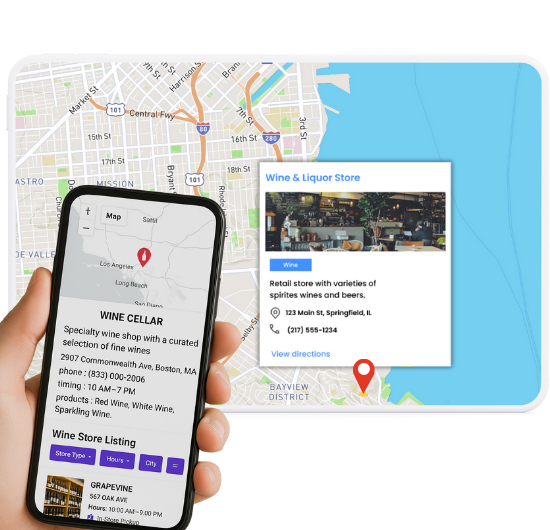
Top Features for Wine & Liquor Store Maps
Our WordPress map plugin offers powerful, flexible, and highly customizable features.
Show Nearby Liquor Stores
Let users discover wine shops and liquor outlets close to their location using geo-location and radius search.
Filter by Category or Brand
Allow users to filter stores by liquor type, wine categories, or brand preferences.
Display Store Hours & Contact Info
Show detailed store profiles with timings, address, phone number, and store-specific notes.
Search by Zip Code or City
Make it easy for users to locate shops by entering a zip code, city, or street name.
Highlight Featured Locations
Promote select stores with custom markers, icons, or infowindow designs.
Mobile-Friendly Design
Works flawlessly across all screen sizes — from desktops to smartphones.
Google Maps & Leaflet Support
Choose your preferred map provider to display stores interactively.
Custom Fields & Tags
Add custom filters like 'Wine Tasting Available', 'Open Late', or 'Free Delivery'.
Display Ratings or Reviews
Add custom rating fields or link to external review pages for trust-building.
Why Choose WP Maps Pro?
Whether you're a distributor or retailer, WP Maps Pro makes it easy to showcase your network of liquor outlets or wine shops on a sleek, interactive map. Boost local discovery, encourage foot traffic, and improve online engagement with a tool designed to convert map views into visits.
- Optimized for WooCommerce and retail flows
- Bulk import wine shop locations via CSV
- Set custom icons for beer, wine, and liquor shops
- Highlight stores with limited-time offers or events
- Display info windows with detailed store data
- Auto-locate user position to show nearby shops
- Enable filtering by open hours or services
- Embed maps using shortcodes or blocks
- Customize map colors to match your brand
- Support for multilingual stores via WPML
- Cluster view for dense city shop listings
- Compatible with popular page builders
Live Map Demo
How to Use WP Maps Pro
Follow these simple steps to get started.
Import Store Data
Prepare your CSV file with store names, addresses, coordinates, and custom fields like delivery or wine type.
Create Your Map
Go to WP Maps Pro dashboard and create a new map. Set your preferred map provider and default center.
Assign Locations to the Map
Select which locations to display on your map based on post types or categories.
Grab Shortcode and Embed
Copy the generated shortcode and paste it into any WordPress page, post, or widget area.
Frequently Asked Questions
Find answers to common questions about Store Locator Plus
Yes, WP Maps Pro supports custom marker icons for different categories.
Absolutely. Users can filter and search by address, city, zip code, or even service tags.
Yes, you can bulk import stores using a CSV file in just a few clicks.
WP Maps Pro integrates well with WooCommerce and can display product-based store filters.
Yes, you can restrict the map to display locations from a particular city, category, or tag.


Build Customizable Maps Now
Create interactive maps with WP MAPS PRO, the top Store Locator Plugin. Try free and unlock all features!