
Find the Best Toy Stores Near You
Map toy stores by brand, location, or specialty – from educational toys to collectibles and play zones.
Explore Toy Store Demo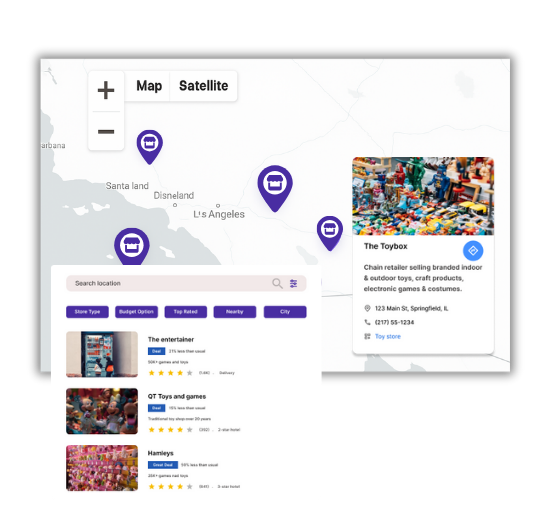
Toy Store Mapping Features You'll Love
Our WordPress map plugin offers powerful, flexible, and highly customizable features.
Map Branded & Local Stores
List chain stores like Hamleys or Toys“R”Us along with local toy shops.
Search by Location or Brand
Let users search for toy shops by ZIP code, city, or brand name.
Filter by Toy Category
Add filters for educational toys, puzzles, collectibles, or age groups.
Store Info with Contact
Show open hours, phone numbers, address, and custom descriptions.
Custom Markers & Icons
Use fun icons like teddy bears or puzzles to mark toy locations.
Mobile Friendly Map
Users can find nearby toy stores easily from any mobile device.
Embed Anywhere via Shortcode
Insert your map into WordPress pages, posts, or blocks.
Bulk CSV Upload
Add hundreds of toy stores quickly via CSV import.
Support for Categories & Tags
Organize stores by product lines, age group, or theme.
Why Choose WP Maps Pro?
Whether you're listing toy chains or boutique stores, WP Maps Pro helps you build a colorful and organized directory that drives foot traffic and improves visibility online.
- Add branded or independent toy retailers
- Use colorful icons to appeal to kids & parents
- Categorize stores by product types or age group
- Display store hours and contact information
- Mobile-friendly maps for parents on-the-go
- Use shortcode to embed maps anywhere
- Filter stores by city, category, or brand
- Bulk import store data easily
- Attract organic traffic with SEO-friendly map pages
- Customize appearance with drag-and-drop builder
- Enable advanced filtering like open status
- Offer a joyful user experience with fun visuals
Live Map Demo
How to Use WP Maps Pro
Follow these simple steps to get started.
Create Toy Categories
Set up categories like Educational, Games, Collectibles, or Dolls.
Add Toy Store Listings
Manually or via CSV, upload store info with address, hours, and contact.
Design Your Map
Choose a theme, customize icons, and set center coordinates.
Paste the Shortcode
Place your map anywhere in WordPress using shortcode blocks.
Frequently Asked Questions
Find answers to common questions about Store Locator Plus
Yes, WP Maps Pro supports all store types with categories or custom tags.
Absolutely! Maps are responsive and load fast across all devices.
You can define categories and assign them when adding each store.
Yes. You can import store listings from CSV or Excel in minutes.
Yes! Use any SVG or image marker that matches your theme.


Build Customizable Maps Now
Create interactive maps with WP MAPS PRO, the top Store Locator Plugin. Try free and unlock all features!