
Add a Salon & Spa Locator to Your WordPress Site
Let users find nearby beauty salons, nail bars, and spas with real-time search and filtering.
Try the Demo Now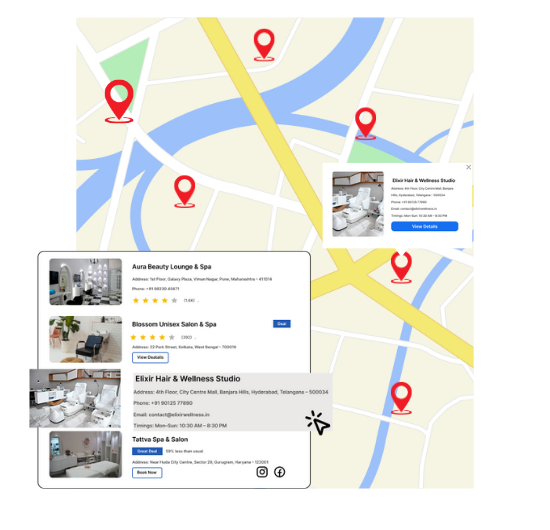
Features That Pamper Your Business
Our WordPress map plugin offers powerful, flexible, and highly customizable features.
Category Filtering
Separate beauty salons, nail bars, and spa centers for easy discovery.
Mobile Friendly Interface
Designed to work seamlessly on smartphones and tablets for on-the-go bookings.
Click-to-Call Support
Users can contact a salon instantly with click-to-call from their device.
Open Status Indicators
Help users see which businesses are currently open.
Customizable Icons
Use icons that reflect spa, hair, or nail services for visual clarity.
Search by Zip or City
Quickly locate nearby salons with geolocation and keyword support.
Live Directions
Instant driving or walking directions from user's location.
Ratings & Reviews
Integrate customer feedback to build trust and increase engagement.
CSV Import
Upload multiple listings with ease using a spreadsheet.
Why Choose WP Maps Pro?
Make beauty easier to find. WP Maps Pro turns your website into a discovery hub for salon seekers.
- Differentiate services using categories and filters
- Highlight open hours and contact details
- Showcase images and brief descriptions for each location
- Display map and directory view together
- Easily import hundreds of spa locations via CSV
- Provide instant directions to every listing
- Enable users to search by zip, name, or category
- Support click-to-call from mobile devices
- Embed the map using simple shortcode
- Responsive layout for all screen sizes
- Supports reviews and custom meta fields
- Quick setup and blazing-fast performance
Live Map Demo
How to Use WP Maps Pro
Follow these simple steps to get started.
Organize Your Salon Data
List name, address, phone, hours, and category (e.g. spa, salon, nail).
Upload Listings
Use the CSV importer to add multiple salon or spa locations easily.
Style Your Map
Customize map icons, layout, colors, and filters to match your brand.
Publish with Shortcode
Insert the map shortcode on any page or builder block.
Frequently Asked Questions
Find answers to common questions about Store Locator Plus
Yes, you can categorize your locations and filter by service type like salon, spa, or nail bar.
Absolutely. The map and listings are fully responsive and mobile-friendly.
Yes, each listing can include a click-to-call phone number for mobile users.
Yes, each listing supports open/closed status which can be displayed and filtered.
Definitely! You can import multiple spa and salon entries using a CSV file.


Build Customizable Maps Now
Create interactive maps with WP MAPS PRO, the top Store Locator Plugin. Try free and unlock all features!