
Add Retail Store Locator in WordPress
Showcase nearby outlets, branches, or chain stores on an interactive map with search, filters, and contact details.
Explore Live Demo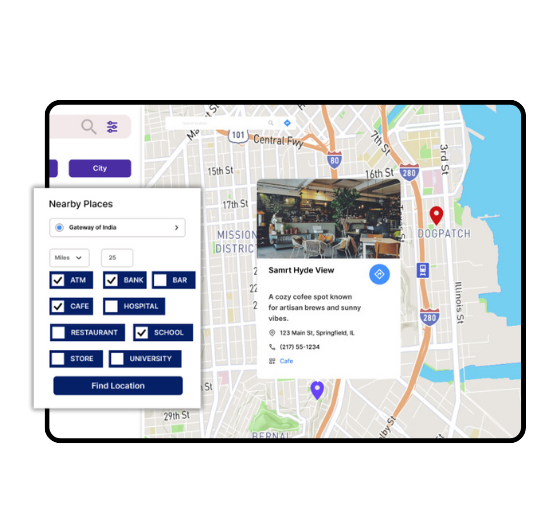
Top Features for Retail Store Locator
Our WordPress map plugin offers powerful, flexible, and highly customizable features.
Find Nearby Outlets
Let customers discover the closest retail branches using automatic geolocation.
Store Details & Directions
Each listing shows address, contact, business hours, and Google Maps navigation.
Powerful Filters
Enable filtering by brand, city, store type, open status, or services.
Custom Icons & Categories
Use branded icons or upload your own to visually distinguish store types.
Bulk Upload Store Data
Import thousands of retail locations at once using a simple CSV.
Works with Page Builders
Easily embed maps into Elementor, Divi, Gutenberg, and others.
Mobile & SEO Optimized
100% responsive and structured for better discoverability.
Add Contact or Feedback Links
Let users reach your store or leave reviews from the map.
Multi-brand Friendly
Great for franchises or businesses operating under multiple brands.
Why Choose WP Maps Pro?
WP Maps Pro is trusted by top retail businesses to drive foot traffic to physical stores. It’s more than a locator – it's a growth tool that turns searches into in-store visits.
- Optimized for franchise and chain store models
- Quick setup with intuitive map interface
- Easily categorize stores by region, service, or brand
- Display distance from user in listings
- Built-in analytics integrations for tracking
- Advanced map styles and UI customization
- Shortcodes, widgets, and Gutenberg blocks support
- Fast performance and cache-friendly
- Location search with autocomplete and radius
- Custom marker clusters for high-density areas
- Fully translatable and WPML ready
- Dedicated support team for enterprise accounts
Live Map Demo
How to Use WP Maps Pro
Follow these simple steps to get started.
Import Store Data
Create a spreadsheet with store names, locations, phone numbers, and assign categories or tags.
Create Your Map
Log in to WP Maps Pro, create a new map, and customize the settings for your retail locator.
Assign Locations to the Map
Attach locations to the map using filters like brand, region, or type of store.
Embed the Map on a Page
Copy the shortcode and paste it into your page, sidebar, or landing section.
Frequently Asked Questions
Find answers to common questions about Store Locator Plus
Yes, you can categorize and tag stores for filtering by brand, region, or any custom label.
There’s no hard limit. You can import thousands of locations via CSV with no performance issues.
Yes. Users can filter by location type, brand, city, open status, and more.
Yes. WP Maps Pro integrates with Google Analytics to track usage and engagement.
Definitely. One-click directions open native maps for turn-by-turn guidance.


Build Customizable Maps Now
Create interactive maps with WP MAPS PRO, the top Store Locator Plugin. Try free and unlock all features!