
Find Nearby Post Offices & Courier Drop Centers
Map all your postal and logistics locations – from post offices to 24/7 drop boxes and courier hubs.
View Demo Map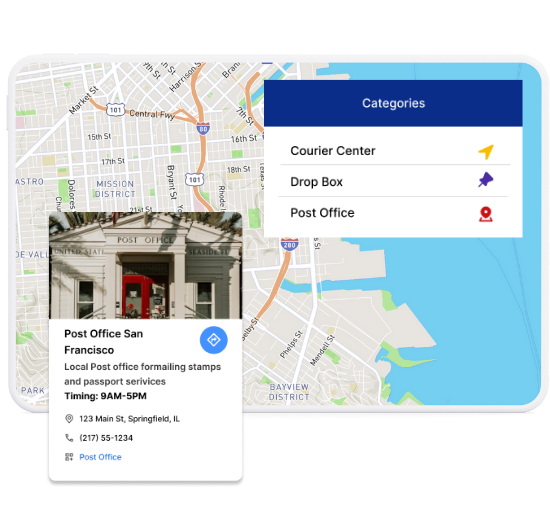
Best Features for Postal & Courier Networks
Our WordPress map plugin offers powerful, flexible, and highly customizable features.
List Postal & Courier Points
Highlight shipping centers, post offices, and drop boxes on an interactive map.
Category-Based Filtering
Let users filter by service types like domestic, international, or express delivery.
Operating Hours Visibility
Show whether a center is currently open and its business hours.
Contact & Location Info
Display address and phone number for each courier or postal facility.
Zip Code or City Search
Users can search by location to find nearby options quickly.
Responsive for Mobile Use
Easily locate services on smartphones and tablets.
Import Locations via CSV
Add hundreds of drop points and logistics offices in one go.
Shortcode Embedding
Publish the map anywhere on your WordPress website easily.
Custom Icons for Services
Use icons to distinguish drop boxes, couriers, and post offices.
Why Choose WP Maps Pro?
Shipping convenience is key for both individuals and businesses. Whether you're tracking a package or looking for a nearby drop-off center, WP Maps Pro lets you showcase your full courier/postal network in an easy-to-use format.
- Filter by post office, drop box, or express courier
- Add markers with business hours and phone numbers
- Search by city, ZIP code, or current location
- Display custom icons based on facility type
- Include directions and address in each popup
- Works on all devices and responsive screens
- CSV importer for bulk upload of locations
- Users can check open status instantly
- Customize design, layout, and categories
- Add embedded maps to any WP page or post
- Optimize listings for local SEO visibility
- Supports multilingual location data
Live Map Demo
How to Use WP Maps Pro
Follow these simple steps to get started.
Add Service Categories
Include types such as Post Offices, Drop Boxes, and Courier Hubs.
Import Locations via CSV
Upload all postal and courier centers with timing and contact info.
Customize Icon & Filters
Assign icons and enable filters by type or open status.
Embed Map via Shortcode
Place the map inside any WordPress post, page, or sidebar.
Frequently Asked Questions
Find answers to common questions about Store Locator Plus
Yes, WP Maps Pro supports category-based filtering with custom icons.
Simply use the built-in CSV importer to add all your courier centers and drop boxes.
Absolutely. The search bar allows users to find nearby locations using postal codes or cities.
Yes, the map is fully responsive and works seamlessly on all devices.
Yes. Each listing can display business hours and live open status if set.


Build Customizable Maps Now
Create interactive maps with WP MAPS PRO, the top Store Locator Plugin. Try free and unlock all features!