
Add a Pharmacy Locator to Your WordPress Site
Enable your users to instantly locate nearby pharmacies and 24/7 medical stores with WP Maps Pro.
See Live Demo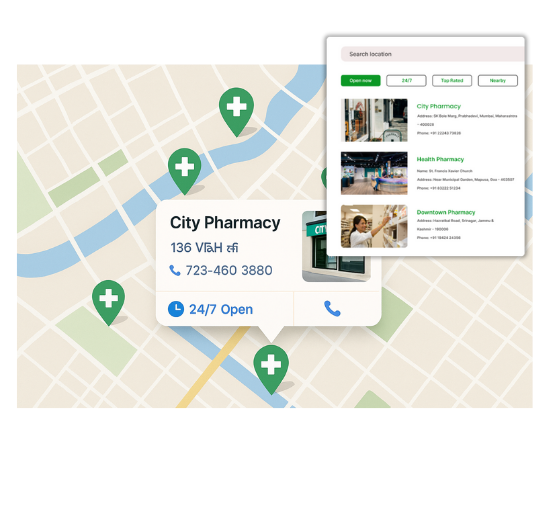
Features Designed for Medical Mapping
Our WordPress map plugin offers powerful, flexible, and highly customizable features.
24/7 Pharmacy Filter
Help users find round-the-clock medical support using real-time filters.
Mobile Ready
Fully responsive layout ensures smooth experience on phones and tablets.
Real-Time Directions
Users can click and get driving directions to the nearest pharmacy.
Category-Based Icons
Use distinctive icons to differentiate 24/7 and regular pharmacies.
Bulk Import Feature
Upload hundreds of pharmacies using a CSV import feature.
Custom Info Fields
Add pharmacy hours, phone numbers, and special services.
Search by City or Zip
Built-in search bar allows filtered results by user location.
Map + Directory
Display results on map and below it with full details.
Compatible with Page Builders
Easily embed pharmacy maps in Elementor, Gutenberg, WPBakery, and more.
Why Choose WP Maps Pro?
Help your users find trusted medical support instantly. WP Maps Pro makes pharmacy discovery effortless.
- Filter open 24/7 pharmacies with ease
- Display availability and contact details at a glance
- Fully responsive across all devices
- Bulk import hundreds of stores at once
- Auto-locate nearest medical help using geolocation
- Customize marker icons for different services
- Use custom fields for license, emergency care, etc.
- Easily searchable by zip, city, or category
- Add shortcode anywhere on your WordPress site
- Multilingual support built-in
- Minimal setup and fast loading
- Perfect for health networks and single locations alike
Live Map Demo
How to Use WP Maps Pro
Follow these simple steps to get started.
Prepare Your Pharmacy List
Add your locations with details like address, phone, category, and hours.
Import with a CSV
Bulk upload all entries through WP Maps Pro import wizard.
Customize Your Map
Set colors, icons, default zoom, and filters for your pharmacy locator.
Embed Anywhere
Use the provided shortcode to place your map on any WordPress page.
Frequently Asked Questions
Find answers to common questions about Store Locator Plus
Yes, the plugin supports filters for availability so users can view only always-open pharmacies.
Absolutely, WP Maps Pro is optimized for use on phones and tablets.
Yes, use the bulk CSV import feature to upload all locations in one go.
Yes, each location can display details like phone, hours, and service type.
Definitely. Clicking on any pin will generate navigation via Google Maps.


Build Customizable Maps Now
Create interactive maps with WP MAPS PRO, the top Store Locator Plugin. Try free and unlock all features!