
Discover Museums, Art Galleries & Exhibitions Near You
Help visitors explore local cultural landmarks, exhibitions, and art spaces using an interactive map.
Explore Demo Now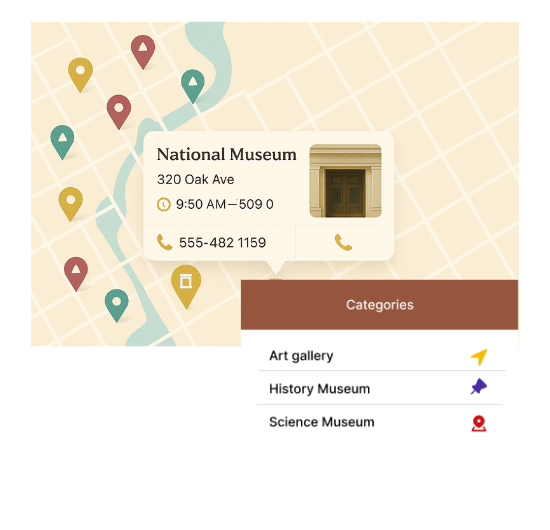
Perfect Features for Cultural Spaces
Our WordPress map plugin offers powerful, flexible, and highly customizable features.
Filter by Museum or Gallery
Let users explore different types of cultural venues effortlessly.
Custom Icons for Venues
Display artistic markers for museums and galleries.
Add Opening Hours
Show when an exhibition or gallery is open to the public.
Mobile Optimized
Visitors can discover cultural hotspots while on the move.
Highlight Events or Exhibits
Mark special events or ongoing exhibitions with unique tags.
Geo-Search Support
Enable users to find cultural centers closest to their current location.
Accessible Location Info
Include address, contact number, and a short venue description.
Embed Anywhere via Shortcode
Add the interactive map to any WordPress page or post.
Supports Multilingual Sites
Works flawlessly with WPML and other translation tools.
Why Choose WP Maps Pro?
Cultural explorers, art lovers, and tourists often seek the closest museums and exhibitions when visiting a city. WP Maps Pro makes it easier than ever to display and organize such listings with style and functionality.
- Separate filters for museums, galleries, and art spaces
- Use category icons to visually represent venue type
- Fully mobile responsive and easy to browse
- Showcase contact information and directions
- Shortcode lets you embed maps anywhere
- Bulk upload venues with CSV import
- Highlight current or upcoming events
- Customizable popups with multimedia support
- Show real-time open status or operating hours
- Location search by city or postal code
- Excellent for tourism and culture-based websites
- Supports multilingual exhibition listings
Live Map Demo
How to Use WP Maps Pro
Follow these simple steps to get started.
Create Venue Categories
Define categories like Museum, Art Gallery, and Special Exhibit.
Add Venue Listings
Include address, open hours, and highlight current exhibits.
Customize Marker Icons
Use visual markers to distinguish cultural venue types.
Publish Map via Shortcode
Embed the interactive map on your cultural directory or tourism page.
Frequently Asked Questions
Find answers to common questions about Store Locator Plus
Yes, you can categorize venues and allow users to filter them easily.
Absolutely! Use tags, icons, or descriptions to spotlight featured events.
Yes, WP Maps Pro is optimized for smartphones and tablets.
Upload all museum and gallery data using the CSV import feature.
Definitely! Users can search by location and explore results instantly.


Build Customizable Maps Now
Create interactive maps with WP MAPS PRO, the top Store Locator Plugin. Try free and unlock all features!