
Find Public, Academic & Community Libraries Nearby
Display all types of libraries on an interactive WordPress map with filters, hours, and directions.
Browse Library Demo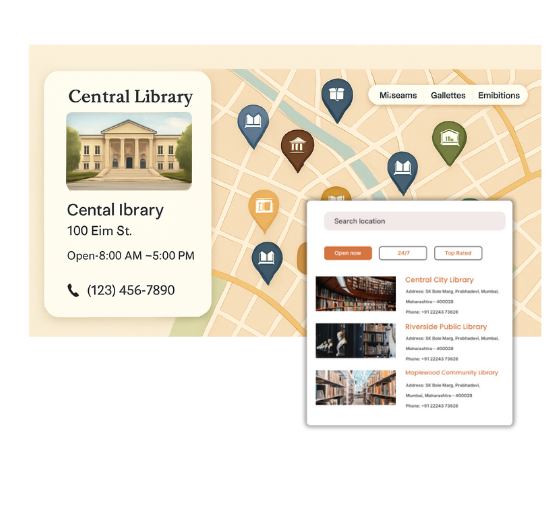
Top Features for Library Maps
Our WordPress map plugin offers powerful, flexible, and highly customizable features.
Map All Library Types
List public, university, community, and children’s libraries in one place.
Search by City or ZIP
Users can find the nearest library using location search.
Service Hours & Contact Info
Show when libraries are open and how to reach them.
Category Filters
Let users filter by library type or accessibility options.
Custom Map Icons
Add custom icons for university, public, or mobile libraries.
Bulk Location Upload
Import all your locations quickly using a CSV file.
Multilingual Ready
Add translations for multilingual library directories.
Responsive Layout
Your library map works seamlessly on mobile, tablet, and desktop.
Shortcode Embedding
Place the map inside any WordPress page or post with a shortcode.
Why Choose WP Maps Pro?
Libraries are essential hubs of knowledge and community services. Whether you're mapping public city libraries or academic research centers, WP Maps Pro provides the tools to create a professional, searchable directory map on your WordPress site.
- Add unlimited libraries by category
- Search by city, postal code, or region
- Filter by library type (public, academic, community)
- Display hours, phone numbers, and address
- Custom map icons for different library types
- Embed map using shortcode on any page
- Works perfectly on mobile and tablet
- SEO optimized for local discovery
- Easy CSV import for bulk location uploads
- Include directions and open status
- Fully responsive and customizable
- Supports multilingual content with WPML or Polylang
Live Map Demo
How to Use WP Maps Pro
Follow these simple steps to get started.
Categorize Libraries
Add types like Public, Academic, Children, or Mobile libraries for clear filters.
Import All Library Data
Use CSV upload to add all your branches, addresses, and info fast.
Customize Appearance
Choose map icons and configure popups with directions and hours.
Embed the Map
Insert the shortcode into any WordPress post, page, or sidebar widget.
Frequently Asked Questions
Find answers to common questions about Store Locator Plus
Yes. Use categories to group libraries by type such as academic, public, or community.
Add each library’s timing in the settings so users know when they’re open.
Yes. Use the shortcode generated by WP Maps Pro to embed the map anywhere.
Absolutely. The map is fully responsive and optimized for mobile screens.
Yes, you can import all library data with our CSV importer feature.


Build Customizable Maps Now
Create interactive maps with WP MAPS PRO, the top Store Locator Plugin. Try free and unlock all features!