
Find Trusted Legal Advisors & Consulting Professionals Near You
Map law firms, tax consultants, and service offices with categories, schedules, and contact info using WP Maps Pro.
View Legal Map Demo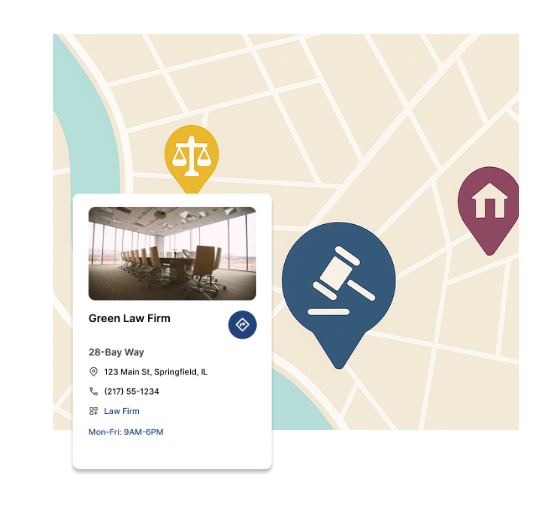
Top Features for Legal & Consultancy Maps
Our WordPress map plugin offers powerful, flexible, and highly customizable features.
Categorize Legal Services
Define categories like Law Firm, Tax Consultant, Business Advisory, and Immigration Services.
Add Availability & Contact
Show open status, phone number, and operating hours for each professional office.
Custom Icons for Law Offices
Use scales, briefcases, or lawyer avatars to distinguish map markers visually.
Filter by Specialty or Region
Allow visitors to filter consultants by field, service type, or city/state.
Open Now Filter
Only show firms and advisors that are currently accepting appointments.
Responsive & SEO-Friendly
Perfectly optimized for mobile, schema-ready for legal search queries.
Bulk Upload via CSV
Quickly import hundreds of consultants or offices using a spreadsheet.
Shortcode Placement
Embed your map on any landing page or within a service page section.
Supports Google & Leaflet
Choose Google for detailed views or Leaflet for a privacy-friendly alternative.
Why Choose WP Maps Pro?
Professionals in legal, tax, and consulting industries rely on visibility and trust. WP Maps Pro lets you list vetted advisors and legal offices with precise filters and business metadata to improve user trust and searchability.
- Easily categorize service types like Law, Tax, Advisory
- Show map with name, phone, and working hours
- Filterable by legal specialty or region
- Upload bulk listings using CSV import
- Display open/close status dynamically
- Use industry icons like scales or contracts
- Embed in homepages or service detail pages
- Supports multiple map styles and skins
- Mobile-optimized views for field search
- Works across any WordPress theme
- Customizable marker labels and icons
- Backed by 18+ add-ons including analytics, frontend filters
Live Map Demo
How to Use WP Maps Pro
Follow these simple steps to get started.
Create Categories by Practice Type
Define categories like Law Firm, Tax Consultant, Immigration, etc. to help users filter results.
Import Your Listings
Use CSV to upload offices, hours, and contact info quickly, or add manually.
Customize Map Icons
Assign icons like briefcase, contract, or gavel to match service types visually.
Embed and Launch
Place the shortcode on your page and go live with a smart, searchable directory.
Frequently Asked Questions
Find answers to common questions about Store Locator Plus
Yes, you can include multiple professionals in one location or assign each their own listing.
Absolutely. You can configure category filters such as Family Law, Corporate Law, or Immigration.
Yes, it looks and works great on all devices, from phones to large screens.
Use the admin dashboard or import a new CSV to refresh locations as needed.
Yes! WP Maps Pro includes schema and clean layouts to help your page rank higher.


Build Customizable Maps Now
Create interactive maps with WP MAPS PRO, the top Store Locator Plugin. Try free and unlock all features!