
Locate Insurance Agents & Policy Assistance Centers Near You
List life, health, auto, and home insurance offices with filters, custom icons, and mobile-ready map layouts using WP Maps Pro.
View Insurance Locator Demo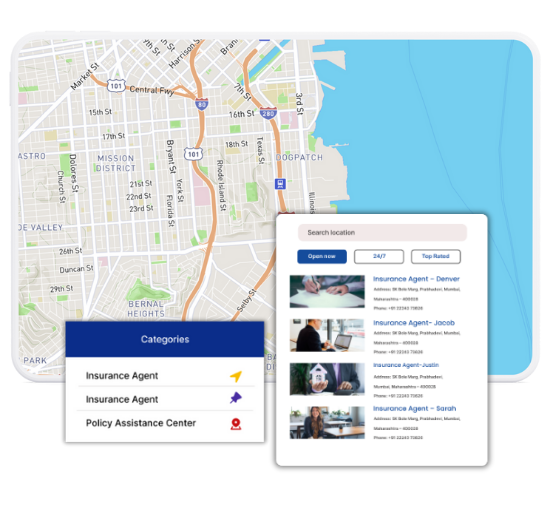
Top Features for Insurance Office Maps
Our WordPress map plugin offers powerful, flexible, and highly customizable features.
Sort by Insurance Type
Categorize listings by life, auto, health, home, or travel insurance.
Display Key Info
Show address, hours, phone, and whether walk-ins or appointments are available.
Insurance Icons
Use marker icons like shield, heart, or car to clearly identify policy types.
Open Status Filter
Display only offices that are currently open or accepting appointments.
Mobile Friendly
Users on-the-go can view and navigate to nearest agents with ease.
SEO Optimized Listings
Pages use schema and load fast, boosting visibility for local insurance queries.
Bulk Upload Support
Quickly import listings of agents or help centers via CSV.
Works with All Themes
Compatible with popular builders like Elementor, Divi, Gutenberg, and more.
Custom Map Styles
Style your insurance map with branded colors and layouts.
Why Choose WP Maps Pro?
When users search for nearby insurance support, quick access and clarity are key. WP Maps Pro allows insurance companies and agents to display contact centers, walk-in offices, and policy help points using a fast, SEO-optimized map experience.
- List offices by insurance category: life, auto, home, health
- Display agent info, hours, and contact
- Allow filtering by location and type
- Mobile-ready, fast, and intuitive UI
- Open status filter for real-time access
- SEO metadata and schema support included
- Supports multiple maps and shortcodes
- Custom markers for insurance services
- Works with Google Maps and Leaflet
- Frontend submissions for agent directories
- Compatible with WPML and RTL
- Supports analytics, radius search & addons
Live Map Demo
How to Use WP Maps Pro
Follow these simple steps to get started.
Set Up Insurance Categories
Define types such as Life Insurance, Auto, Health, Home, etc.
Add or Import Office Locations
Upload multiple entries or manually enter agents and their details.
Customize Appearance
Choose marker styles like shields, hearts, or cars to visually organize listings.
Display with Shortcode
Place the shortcode on any WordPress page to activate your map directory.
Frequently Asked Questions
Find answers to common questions about Store Locator Plus
Yes, you can create categories for different types of insurance and assign them to each location.
Absolutely. You can mark these using icons and label them as always open in the settings.
Yes. WP Maps Pro supports both map providers seamlessly.
Use the 'open status' filter to let users view only active or walk-in ready locations.
Yes. Schema markup, fast performance, and location-rich data boost your SEO.


Build Customizable Maps Now
Create interactive maps with WP MAPS PRO, the top Store Locator Plugin. Try free and unlock all features!