
Create a Hotel & Resort Locator in WordPress
Help travelers explore luxury resorts, cozy BnBs, and vacation rentals with interactive filters and maps.
Explore Stays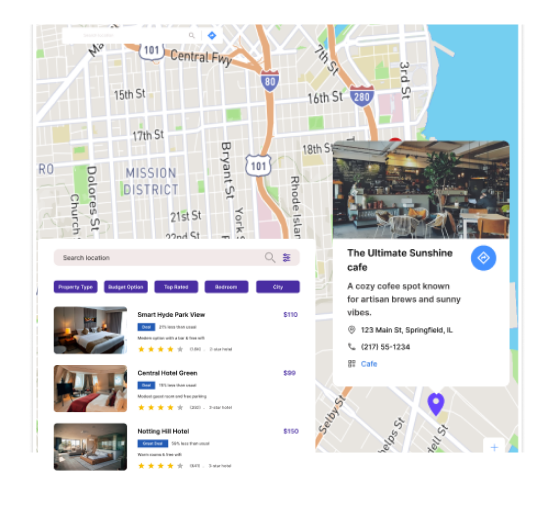
Powerful Features for Your Travel Maps
Our WordPress map plugin offers powerful, flexible, and highly customizable features.
Accommodation Filters
Let users browse by resort type, rating, or availability in real-time.
Highlight Amenities
Showcase pools, spas, gyms, pet-friendliness, and more in infowindows.
Mobile Friendly Maps
Let travelers search for stays using any device while on the go.
Custom Icons per Stay Type
Visualize hotels, BnBs, and vacation homes with unique category icons.
Directions & Route Info
Users can quickly get directions to their stay directly from the map.
Show Open Now Listings
Filter by operational status or check-in availability.
SEO Ready & Fast
Built with speed, structure, and mobile optimization in mind.
Shortcode Integration
Easily embed the locator map on any WordPress page or widget.
Multi-language Support
Offer your map experience in multiple languages with WPML or TranslatePress.
Why Choose WP Maps Pro?
From boutique escapes to beachfront resorts, WP Maps Pro helps travel sites, tourism boards, and hospitality brands guide users to the perfect stay.
- Visualize luxury stays across regions or countries
- Differentiate hotels, BnBs, and rentals with map filters
- Add contact info, open status, and booking details
- Highlight reviews or featured properties
- Enable users to get directions in one click
- Customize icons for better UX and branding
- Show real-time availability with open status filter
- Easy CSV import for 100s of locations
- Responsive across devices and screen sizes
- Perfect for tourism sites and real estate portals
- Translation ready for multilingual travelers
- Seamless integration with Elementor and Gutenberg
Live Map Demo
How to Use WP Maps Pro
Follow these simple steps to get started.
Gather Location Data
Prepare your list of hotels, resorts, or rentals including address, phone, type, and timing.
Import Locations via CSV
Upload all your stay listings using the built-in importer for speed and consistency.
Design Your Locator Map
Configure categories, filters, zoom levels, and icons to match your site’s travel theme.
Add to WordPress Page
Place the map on any landing page or blog with a simple shortcode.
Frequently Asked Questions
Find answers to common questions about Store Locator Plus
Yes, categories like Luxury, BnB, or Rentals can be created and used for filtering.
Absolutely. WP Maps Pro allows bulk imports via CSV or Excel files.
Yes, maps are optimized for phones, tablets, and desktops without extra setup.
You can include custom fields in the map listing such as price, availability, or links.
Yes, you can use the 'Open Status' filter to display active or available properties.


Build Customizable Maps Now
Create interactive maps with WP MAPS PRO, the top Store Locator Plugin. Try free and unlock all features!