
Add Hospital & Clinic Locator in WordPress
Help patients quickly find hospitals, clinics, diagnostic labs, and walk-ins near them with real-time filtering and geolocation.
Explore Live Demo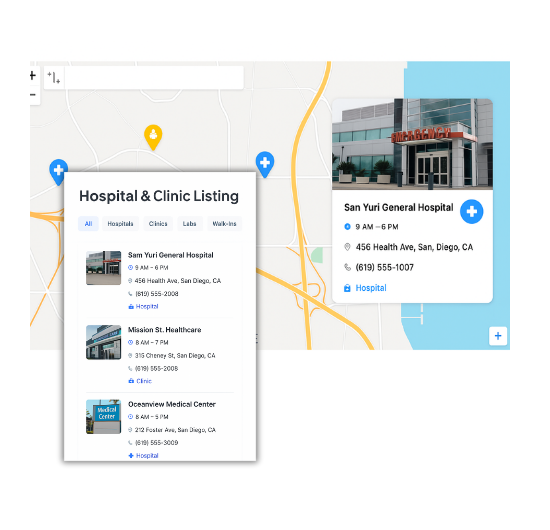
Top Features for Hospital & Clinic Locator
Our WordPress map plugin offers powerful, flexible, and highly customizable features.
Geolocation Search
Let patients locate the nearest medical facility in real-time using their current location.
Filter by Facility Type
Enable filtering between hospitals, clinics, and diagnostic labs.
Contact Info & Timings
Show phone numbers, open hours, and categories in every location.
Accessible Route Links
Provide directions to help patients navigate quickly during emergencies.
Emergency Open Status
Indicate which facilities are open and accepting walk-ins.
Easy Embedding
Embed medical maps on any page using shortcodes or page builders.
Responsive Design
Mobile-friendly UI ensures patients can search from anywhere.
Bulk Location Upload
Add multiple hospitals and clinics using CSV imports.
Real-Time Filters
Users can narrow their search by city, day of week, and open hours.
Why Choose WP Maps Pro?
WP Maps Pro helps medical institutions guide patients to the right care — faster. From multispecialty hospitals to diagnostics and walk-in clinics, display everything in one professional map interface.
- Highlight facilities based on services (emergency, lab, etc.)
- Filter and categorize clinics by type, city, or network
- Supports multilingual labels for accessibility
- Ideal for healthcare chains, universities, or local health departments
- Easy to embed anywhere with Elementor, Gutenberg, etc.
- Geolocation support to auto-detect user’s position
- Shortcode integration with WP forms and popups
- Fast loading and optimized for mobile browsing
- Customize marker icons for each facility type
- Integration-ready with Google Analytics or tag manager
- Open status display and business hours customization
- Developer hooks for extending functionality
Live Map Demo
How to Use WP Maps Pro
Follow these simple steps to get started.
Import Facility Data
Create a CSV with hospital/clinic details like address, phone, and category, and import it.
Create Your Map
Launch the WP Maps Pro interface and create a new map configured for healthcare navigation.
Assign Locations to the Map
Link imported facilities to your new map using filters or category selectors.
Display the Map on Website
Embed the shortcode into your page to make the map live and accessible to patients.
Frequently Asked Questions
Find answers to common questions about Store Locator Plus
Yes. WP Maps Pro supports custom icons and categories for each facility type.
Absolutely. You can indicate 24/7 open status and add quick navigation buttons.
Yes. You can add a custom field like 'Open Now' and filter by it.
Yes. You can embed links or popups that open forms per location.
WP Maps Pro doesn’t store patient data, so it can be used in HIPAA-safe contexts when self-hosted.


Build Customizable Maps Now
Create interactive maps with WP MAPS PRO, the top Store Locator Plugin. Try free and unlock all features!