
Add Gym & Fitness Center Locator in WordPress
Help users find gyms, yoga studios, and wellness hubs nearby with interactive filters and a mobile-friendly map.
Explore Live Demo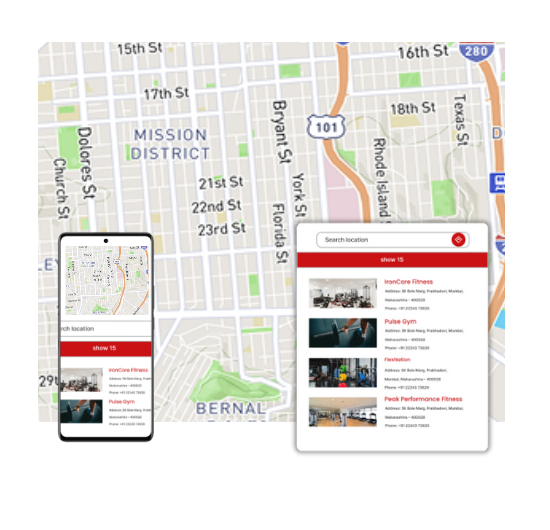
Top Features for Fitness Map Locator
Our WordPress map plugin offers powerful, flexible, and highly customizable features.
Geolocation Support
Users can instantly locate the nearest gym or studio from their current position.
Filter by Fitness Type
Allow filtering between gyms, yoga studios, and holistic wellness centers.
Real-Time Open Status
Show live open/closed status to avoid unnecessary visits.
Operating Hours Display
Clearly list each facility's daily open and close hours.
Category-Based Icons
Visual icons help users distinguish facility types quickly.
Mobile-Optimized
Designed for seamless map usage on phones and tablets.
Custom Map Styling
Easily change map themes to match your fitness brand.
Bulk Upload Support
Import hundreds of gyms or wellness locations using a CSV file.
Directions Integration
One-click navigation to reach the nearest fitness facility fast.
Why Choose WP Maps Pro?
Whether you run a nationwide chain of gyms or manage a handful of yoga studios, WP Maps Pro helps your audience find their fitness path. Engage new members by giving them a clear, accessible map of your offerings.
- Perfect for franchises, gym networks, or health clubs
- Showcase classes, services, and hours per location
- Highlight special amenities like sauna, pool, or personal trainers
- Use map categories for better visual segmentation
- Embed maps anywhere in WordPress: Gutenberg, Elementor, etc.
- Geolocation allows users to find what's nearby right away
- Users can filter by fitness type or opening status
- CSV import streamlines adding or updating multiple centers
- Custom icons make each facility type stand out
- Add buttons or forms to request trials or book sessions
- Fully responsive and lightning-fast on mobile
- Optimized for SEO and conversion with schema-ready content
Live Map Demo
How to Use WP Maps Pro
Follow these simple steps to get started.
Import Gym & Studio Locations
Prepare your CSV with name, address, category, and timings, and upload it into WP Maps Pro.
Create Fitness Locator Map
Use the intuitive map builder to configure styles, zoom level, and category markers.
Assign Facilities to the Map
Link the uploaded gyms and studios to your new map for organized display.
Publish Map on Your Site
Use the shortcode on any WordPress page to embed and go live.
Frequently Asked Questions
Find answers to common questions about Store Locator Plus
Yes. Use map categories like gym, yoga, and wellness to separate facility types.
Absolutely. Each map marker can generate a route via Google Maps in one click.
Yes. Add custom HTML, buttons, or embed forms in your info windows.
Yes, it's fully responsive and optimized for mobile and tablet views.
Definitely. WP Maps Pro lets you upload and assign unique icons per category.


Build Customizable Maps Now
Create interactive maps with WP MAPS PRO, the top Store Locator Plugin. Try free and unlock all features!