
Locate Municipal Offices, Courts & Embassies Easily
Provide an accessible map for citizens to find government offices, administrative centers, and public service locations across the region.
View Government Map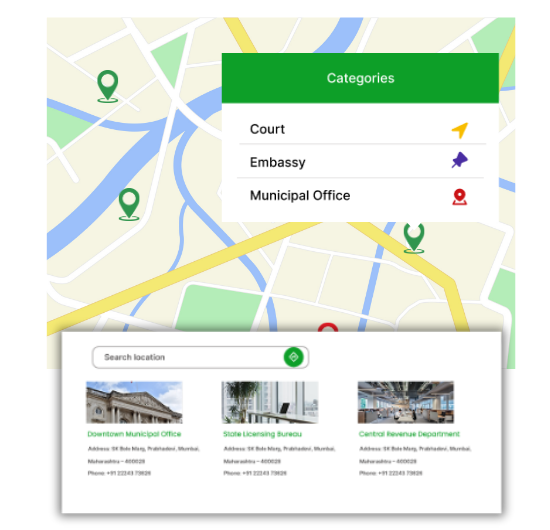
Government Mapping Made Easy
Our WordPress map plugin offers powerful, flexible, and highly customizable features.
Display All Government Services
Map courthouses, municipal buildings, departments, and embassies.
Public-Facing Interface
Easy to navigate for citizens seeking services.
Office Timing & Status
Show which offices are open today and current service hours.
Contact Information Included
Each listing contains phone numbers, address, and additional info.
Search by Region or Office Type
Users can filter based on service, department or location.
Mobile & Accessible
Map is responsive and meets accessibility standards.
Category-Based Listings
Separate layers for embassies, courts, and administrative branches.
Multilingual Ready
Perfect for embassies or multilingual municipalities.
Embed Anywhere
Use shortcode to display the map on any government website or portal.
Why Choose WP Maps Pro?
Governments and civic organizations need reliable tools to guide citizens to services. WP Maps Pro allows public offices to create interactive maps that help visitors quickly find the nearest and most relevant facility.
- Simplify navigation to public offices and courts
- Display open hours, address, and contact for each location
- Mobile responsive and fully accessible design
- Add location markers with custom icons and filters
- Works with translation plugins like WPML
- Upload multiple listings at once via CSV import
- Highlight important or emergency service centers
- Search by region, district or service type
- Shortcode-based display for use on any WordPress page
- Customize popup content for clarity
- Ideal for public service directories and city portals
- Optimized for speed and clarity
Live Map Demo
How to Use WP Maps Pro
Follow these simple steps to get started.
Categorize Office Types
Group locations into categories such as courts, embassies, or city services.
Add Office Details
Include addresses, working hours, and service contact information.
Customize Your Map
Apply map styling, icons, and filter options for office types.
Publish with Shortcode
Place the map on your WordPress website for easy public access.
Frequently Asked Questions
Find answers to common questions about Store Locator Plus
Yes, you can create categories like embassies, municipal offices, or public departments.
Absolutely. Filters can be based on office type, region, or services.
Yes. The map works seamlessly on smartphones, tablets, and desktops.
Yes. Use the built-in CSV import tool to upload multiple locations.
Definitely. WP Maps Pro supports WPML and other translation plugins.


Build Customizable Maps Now
Create interactive maps with WP MAPS PRO, the top Store Locator Plugin. Try free and unlock all features!