
Find Garden Shops & Plant Nurseries Nearby
Help gardening enthusiasts locate nearby garden centers, plant nurseries, and landscaping experts with a powerful and easy-to-use WordPress map.
View Live Map Demo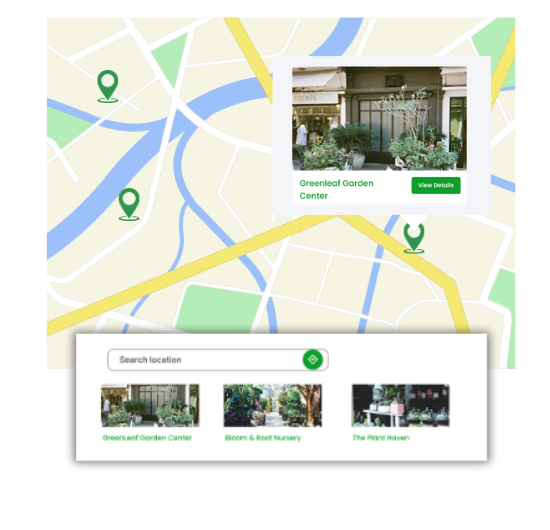
Must-Have Features for Garden Maps
Our WordPress map plugin offers powerful, flexible, and highly customizable features.
List Nurseries & Plant Stores
Display local nurseries, gardening supply shops, and botanical outlets on your site.
Filter by Plant or Service Type
Let visitors filter by indoor plants, outdoor plants, fertilizers, or landscaping services.
Show Operating Hours & Address
Include business timings, contact number, and physical address for each listing.
Add Custom Markers
Use garden-themed icons to highlight listings – leaves, pots, flowers, etc.
Mobile & SEO Friendly
Responsive design and schema-enabled maps help you rank and reach users on all devices.
Easy CSV Import
Add hundreds of listings quickly using CSV or Excel upload.
Categorize Listings
Group locations by service – nursery, gardening, greenhouse, compost centers, etc.
Insert Anywhere
Use shortcode to place the map on any page or post.
Supports Multiple Map Providers
Switch between Google Maps or Leaflet easily.
Why Choose WP Maps Pro?
Gardeners, landscapers, and plant lovers alike often search for local nurseries or garden supply shops. With WP Maps Pro, you can create a location-rich garden map that's easy to manage and delightful to use.
- Show all local nurseries, garden shops, and compost centers
- Categorize stores by type: Indoor, Outdoor, Fertilizers, Tools
- Highlight contact info, working hours, and images
- Support filtering by plant or garden type
- Custom marker icons for garden tools, trees, and flowers
- Easily import bulk listings with CSV
- Display map shortcode anywhere in your theme or post
- Mobile-optimized maps that look great on all devices
- Compatible with multilingual sites and RTL languages
- Connect customers to the nearest green hub
- Optimize listing for search engines with rich schema
- Integrate with over 18+ WP Maps Pro add-ons
Live Map Demo
How to Use WP Maps Pro
Follow these simple steps to get started.
Create Plant Categories
Group stores by product or plant types like Trees, Fertilizers, or Indoor Plants.
Add Garden Listings
Use CSV or manual input to upload name, location, description, and open hours.
Customize Appearance
Pick a green-themed layout and assign floral or leaf icons for charm.
Place on Website
Insert the shortcode into your Garden Map or Contact page to go live.
Frequently Asked Questions
Find answers to common questions about Store Locator Plus
Yes! Add any type of green business and organize them into separate categories.
Absolutely. WP Maps Pro is fully responsive for smartphones and tablets.
Yes, you can upload your locations via CSV file with ease.
Yes. Use SVG, PNG, or JPG icons related to gardening for each marker.
Definitely. Maps are schema-optimized and designed to boost search rankings.


Build Customizable Maps Now
Create interactive maps with WP MAPS PRO, the top Store Locator Plugin. Try free and unlock all features!