
Find Top Electronics Retailers in Your Area
Map mobile shops, appliance outlets, and electronics megastores with categories and real-time filters.
View Live Demo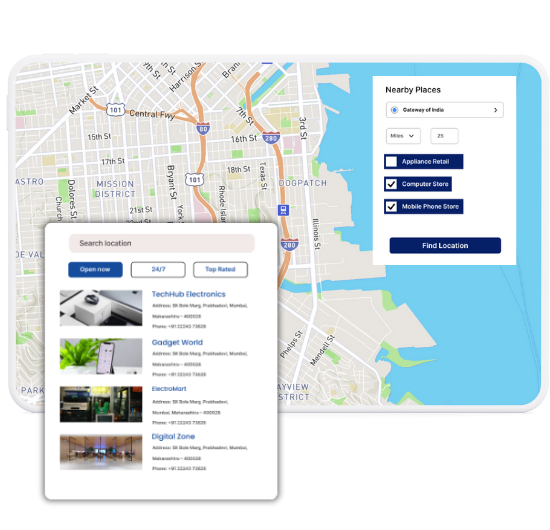
Must-Have Features for Electronics Maps
Our WordPress map plugin offers powerful, flexible, and highly customizable features.
Show Mobile & Electronics Stores
Display shops that sell smartphones, TVs, laptops, accessories, and appliances.
Filter by Product Type
Let users filter by gadgets, home appliances, gaming consoles, or repair centers.
Add Business Hours & Location
Share open hours, phone numbers, and accurate addresses for every location.
Responsive & Touch Optimized
Perfect on desktop and mobile, with fast loading and easy pin tapping.
Upload Listings via CSV
Add 10 or 1000+ stores easily using CSV or Excel import.
Custom Marker Icons
Use electronics-themed icons for quick visual distinction – TVs, phones, gadgets.
Google or Leaflet Maps
Choose your preferred map provider – Leaflet for free, Google for detailed views.
Embed Anywhere
Use shortcode to add your electronics map to any page or widget area.
Open/Closed Filter
Help users quickly spot stores that are currently open.
Why Choose WP Maps Pro?
With thousands of electronics stores and franchises operating locally, it’s important to help users find the exact type of product or service they need. WP Maps Pro simplifies this with advanced map filters and mobile-ready design.
- Show a full directory of electronics retailers
- Add categories like Mobile, Laptop, Home Appliances, Repairs
- Support both single-location and multi-branch stores
- SEO-optimized maps with schema for better rankings
- Highlight open hours and current availability
- Use icons like TVs, phones, or computers
- Import store data in bulk using CSV
- Supports shortcode placement anywhere on site
- Responsive on all screen sizes
- Includes filtering by city, state, and device type
- Easy integration with WP themes
- Backed by 18+ powerful WP Maps Pro add-ons
Live Map Demo
How to Use WP Maps Pro
Follow these simple steps to get started.
Define Categories by Product Type
Start with product filters like Mobile, Computer, TV, and Appliances.
Add Your Electronics Store Locations
Upload data via CSV or manually input details including contact and images.
Assign Icons and Customize
Apply electronics-themed markers to help users distinguish easily.
Publish the Locator
Place your shortcode on the landing page or sidebar to launch the map.
Frequently Asked Questions
Find answers to common questions about Store Locator Plus
Yes! Create categories for different products or brands and filter them easily.
Yes, you can allow users to filter by category, state, or city.
Fully. All map views and features work smoothly across mobile and tablet.
Use the backend dashboard or CSV import to update your data anytime.
Definitely. Schema markup and keyword-rich content help your map pages rank well.


Build Customizable Maps Now
Create interactive maps with WP MAPS PRO, the top Store Locator Plugin. Try free and unlock all features!