
Find Authorized Dealers and Regional Warehouses with Ease
Map out distributors, fulfillment centers, and supply hubs across any region using WP Maps Pro with filters, categories, and smart map layouts.
Launch Dealer Locator Demo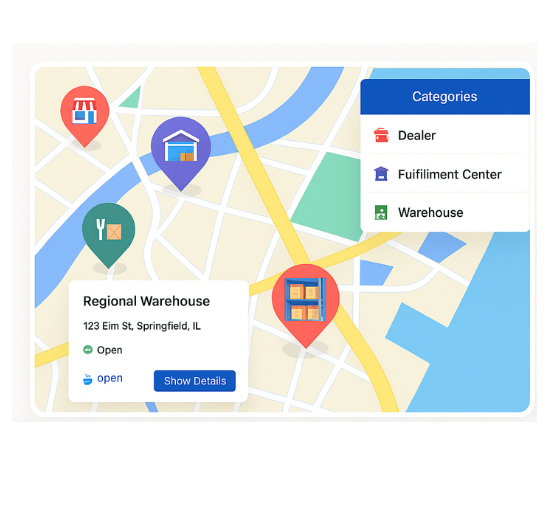
Top Features for Dealer & Warehouse Locators
Our WordPress map plugin offers powerful, flexible, and highly customizable features.
Segment Dealers & Warehouses
Categorize locations into B2B dealers, fulfillment centers, and wholesale distributors.
Search by Region or State
Enable filters for city, region, or service zone to find nearby supply points.
Use Warehouse Icons
Map markers include storage, logistics, and industrial-style visuals for easy recognition.
Bulk Data Upload
Manage thousands of dealers or hubs with simple CSV import.
Display Operating Times
Show which warehouses are open and accepting delivery/pickup today.
Responsive Design
Mobile-friendly and optimized for sales or logistics teams on the move.
Location Metadata
Include address, region served, contact person, and capacity.
Embed Anywhere
Place the map on portals, dashboards, or customer support pages.
Google Maps & Leaflet Ready
Switch map providers based on your preference and privacy needs.
Why Choose WP Maps Pro?
Logistics, fulfillment, and dealership networks require a powerful visual directory. WP Maps Pro offers you a streamlined way to show warehouses, regional agents, and delivery hubs across multiple states or countries using search, filters, and map clustering.
- Segment locations by dealer, warehouse, or support center
- Show address, region, contact, and opening hours
- Use industrial-themed icons for easy visuals
- Apply open status filters for time-based listings
- Add or import hundreds of locations easily
- SEO-friendly and schema-rich map pages
- Embed on internal portals or public pages
- Use map clustering for dense metro zones
- Live map demos with shortcodes
- Works with Elementor, Divi, and more
- Sync locations across multiple maps
- Backed by powerful WP Maps Pro extensions
Live Map Demo
How to Use WP Maps Pro
Follow these simple steps to get started.
Set Dealer & Warehouse Categories
Use WP Maps Pro’s backend to define categories such as Authorized Dealer, Main Warehouse, Pickup Hub.
Add or Import Location Data
Quickly import dealer/warehouse records via CSV or add each location manually.
Assign Map Icons and Info
Add details like zone served, operating hours, and visual marker per category.
Publish Your Map Anywhere
Embed your dynamic dealer locator on landing pages, product sites, or distributor dashboards.
Frequently Asked Questions
Find answers to common questions about Store Locator Plus
Yes, simply assign different categories and icons to each type of location.
Absolutely. Use the built-in CSV import to upload large datasets instantly.
Yes. WP Maps Pro supports regional filtering using address or metadata fields.
Yes. Your logistics and sales teams can use it easily from phones and tablets.
Yes. Upload your own icon sets or use WP Maps Pro’s library of logistics markers.


Build Customizable Maps Now
Create interactive maps with WP MAPS PRO, the top Store Locator Plugin. Try free and unlock all features!