
Help Users Find the Perfect Coworking Space Near Them
Easily display shared offices, business hubs, or meeting venues across cities with advanced filters, directions, and search features.
Create My Coworking Map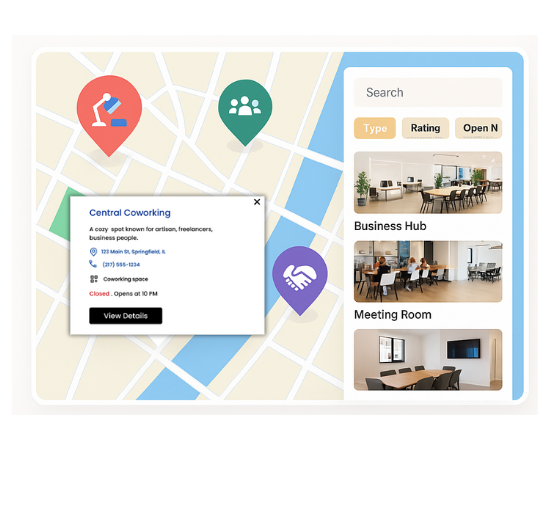
Top Features for Coworking Maps
Our WordPress map plugin offers powerful, flexible, and highly customizable features.
List Multiple Spaces
Show unlimited coworking spots on one map with category and tag filters.
Display Amenities
Add facilities like Wi-Fi, meeting rooms, parking, and 24x7 access via custom fields.
Availability Filters
Let users filter spaces by day/time availability or open hours.
Showcase Photos
Include interior photos, descriptions, and contact links in infowindows.
Get Directions
Allow users to generate directions from their current location to the selected space.
Search & Radius Filter
Enable smart search by city, zip code, or distance to narrow down the list.
CSV Import
Bulk import all coworking locations and amenities with just one file.
Preview Layouts
Choose from prebuilt listing designs and customize with Elementor or WPBakery.
Mobile Optimized
Fully responsive so users can search spaces while on the go.
Why Choose WP Maps Pro?
Coworking is booming. Whether you run a chain of shared offices or manage independent hubs, WP Maps Pro helps users locate, explore, and reach your spaces with ease — boosting occupancy, visibility, and bookings.
- Modern and responsive coworking map layouts
- Create categories for desk types, rooms, or services
- Showcase reviews, ratings, or testimonials
- Highlight premium or featured listings visually
- Let users find the nearest open coworking space instantly
- Integrate Contact Form 7 or Gravity Forms for bookings
- Control visibility using shortcodes or taxonomies
- Customizable marker icons and infowindow popups
- Connect with Google Maps or open-source Leaflet
- Quick load time even with hundreds of spaces
- SEO-ready design for visibility on search engines
- Support for ACF, WPML, Polylang and major themes
Live Map Demo
How to Use WP Maps Pro
Follow these simple steps to get started.
Prepare Your Coworking Data
Gather all space details like name, address, amenities, categories, and save it in CSV format.
Create Your Map
Head over to WP Maps Pro > Add Map, select your provider, center point, and default zoom.
Import & Assign Spaces
Import the CSV data and assign spaces to the map. You can group by category or tag.
Customize & Embed
Tweak design, add filters or listing styles, then copy-paste the shortcode into any page or post.
Frequently Asked Questions
Find answers to common questions about Store Locator Plus
Yes. You can add categories like Hot Desk, Meeting Room, or Private Cabin and display them as filters.
Absolutely. You can use custom fields or ACF to show amenities and let users filter by them.
Yes, you can use the shortcode inside Elementor, WPBakery, Gutenberg, or any page builder.
WP Maps Pro maps are fully responsive and mobile-friendly by default.
They can click a 'Get Directions' button on the map to open route guidance in Google Maps.


Build Customizable Maps Now
Create interactive maps with WP MAPS PRO, the top Store Locator Plugin. Try free and unlock all features!