
Display Ongoing Projects & Property Development Sites
Help investors and buyers visualize housing projects, construction plots, and real estate ventures on a searchable interactive map.
View Project Demo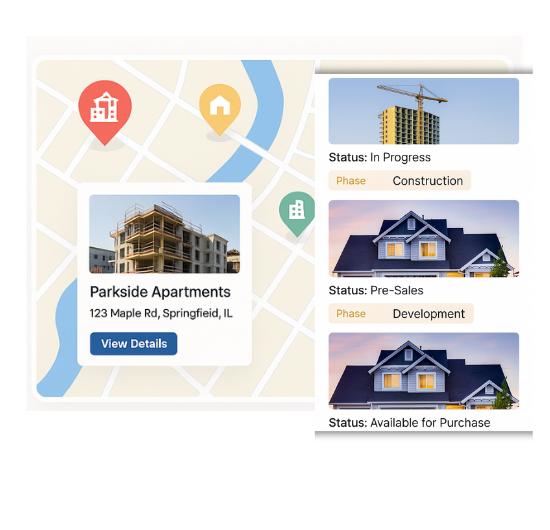
Mapping Tools for Real Estate & Infrastructure
Our WordPress map plugin offers powerful, flexible, and highly customizable features.
List Ongoing Projects
Map residential, commercial, or infrastructure projects with live progress status.
Show Plot Availability
Highlight available, reserved, or sold development plots by color.
Filter by Builder/Location
Allow users to search by developer, city, or region.
Status-based Icons
Use icons or colors for upcoming, ongoing, or completed sites.
Add Floor Plans & Images
Attach galleries or plan PDFs to each project location.
Contact Builder CTA
Let users connect directly with developers via phone or email.
Map Custom Filters
Create filters like plot size, type, builder, or phase.
Mobile Friendly
View construction data across mobile and tablet devices.
CSV Bulk Import
Upload large-scale projects and listings using a spreadsheet.
Why Choose WP Maps Pro?
WP Maps Pro allows construction companies, developers, and real estate agencies to visually present new projects, sites, and availability status. A powerful directory map makes it easier for buyers and stakeholders to explore investment opportunities interactively.
- Highlight residential and commercial projects
- Display development stage – upcoming, active, or completed
- Let users filter by city, builder, price, or size
- Use unique icons and colors to indicate plot status
- Attach PDFs, plan images, or galleries to listings
- Allow user interaction via tooltips or popups
- Mobile responsive for on-site stakeholders
- Add custom fields like units available, price, or area
- Bulk import listings with coordinates and metadata
- Shortcode-ready for seamless page integration
- Optimize for SEO and real estate keywords
- Compatible with multilingual WordPress sites
Live Map Demo
How to Use WP Maps Pro
Follow these simple steps to get started.
Define Project Categories
Set up categories such as Residential, Commercial, and Infrastructure.
Add Plot Listings or Projects
Add or import listings using a CSV file with coordinates and project details.
Customize Icons & Filters
Use filters like builder, status, and location to enhance user experience.
Embed via Shortcode
Paste the map shortcode into your landing page or project section.
Frequently Asked Questions
Find answers to common questions about Store Locator Plus
Yes, you can use categories or custom fields to show Available, Sold, or Reserved.
Absolutely. The map works smoothly on mobile and tablet devices.
Yes, WP Maps Pro supports bulk CSV import with coordinates and metadata.
Yes. Each marker can have a popup with images, PDFs, and additional details.
You can enable custom filters for city, developer name, or project stage.


Build Customizable Maps Now
Create interactive maps with WP MAPS PRO, the top Store Locator Plugin. Try free and unlock all features!