
Discover Fashion Outlets & Clothing Boutiques Near You
Help your users find trending apparel, luxury stores, and street fashion hubs quickly and visually.
See Clothing Store Demo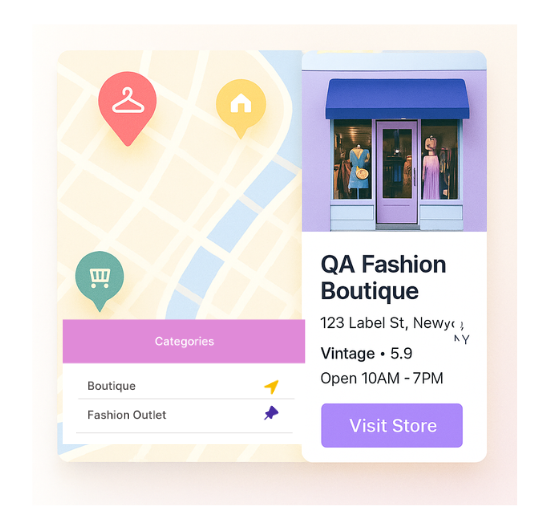
Top Features for Clothing Store Maps
Our WordPress map plugin offers powerful, flexible, and highly customizable features.
Highlight Fashion Categories
Categorize shops by Men’s, Women’s, Kids’, Accessories, or Luxury.
Show Store Details
Display working hours, addresses, and store images for better UX.
Style with Icons
Add dress icons, t-shirts, or heels for a polished map experience.
Custom Filters
Filter by clothing category, brand type, or city.
Open/Close Status
Help shoppers plan visits with active store status indicators.
Mobile Optimized
Touch-friendly layouts that look perfect on phones and tablets.
SEO Optimized Pages
Rank your store locators with schema-rich content and fast load times.
CSV Import Support
Upload multiple store entries quickly using CSV files.
Shortcode Integration
Embed your clothing store locator into any page or widget.
Why Choose WP Maps Pro?
Fashion-conscious users want quick, elegant ways to discover shops near them. WP Maps Pro makes it easy to list branded boutiques, outlet chains, and trending clothing destinations in one powerful map.
- Categorize by apparel type or brand
- Display icons for fashion categories
- Map boutique and chain stores side-by-side
- SEO-ready page content and shortcode support
- Easy CSV import for bulk stores
- Customize the look with icons and labels
- Fast loading and mobile-first design
- Supports both Google Maps and Leaflet
- Geo-location support to auto-find nearby stores
- Open/close filter for real-time discovery
- Works with all WordPress themes
- Supports multilingual sites and RTL languages
Live Map Demo
How to Use WP Maps Pro
Follow these simple steps to get started.
Create Fashion Categories
Add categories like Women’s, Men’s, Unisex, Accessories, or Luxury.
Import or Add Store Listings
Upload via CSV or manually add store name, timing, location, and type.
Assign Clothing Icons
Select icons like dresses, shoes, or branded tags to represent stores visually.
Publish Your Map
Place your shortcode anywhere to display the stylish store locator.
Frequently Asked Questions
Find answers to common questions about Store Locator Plus
Yes, you can define any category such as Men, Women, Kids, or Luxury.
Absolutely! You can toggle 'open status' filters so users only see active listings.
Yes. WP Maps Pro supports multi-branch businesses and filterable brand types.
Yes, the store locator is responsive and optimized for all devices.
You can use shortcode to embed it anywhere: page, section, or widget.


Build Customizable Maps Now
Create interactive maps with WP MAPS PRO, the top Store Locator Plugin. Try free and unlock all features!