
Discover Theaters, Gaming Zones & Arcades Nearby
Help users explore local entertainment venues with filters for theaters, games, and fun zones.
Try Live Demo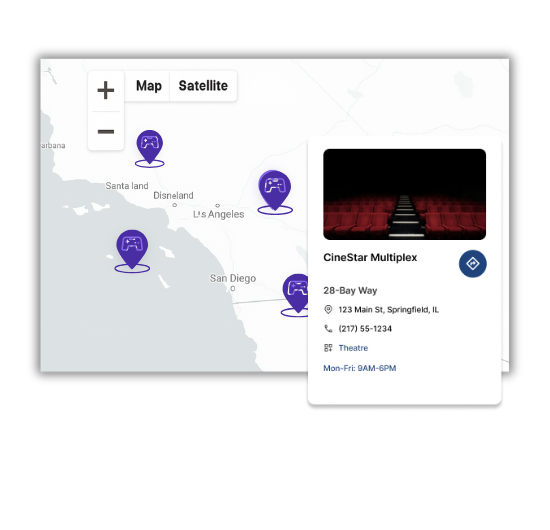
Top Features Built for Entertainment Mapping
Our WordPress map plugin offers powerful, flexible, and highly customizable features.
Filter by Venue Type
Search for theaters, arcades, or gaming lounges with a click.
Interactive Map Display
Allow users to explore locations visually with custom icons and popups.
Responsive Layout
Works seamlessly across mobile, tablet, and desktop devices.
Custom InfoWindows
Display venue timing, address, and entertainment highlights.
Real-Time Open Status
Show whether a cinema or arcade is open right now.
Location Clustering
Group venues on dense maps to reduce clutter and improve readability.
Add Ratings & Tags
Highlight top-rated cinemas or trending arcades.
Geo-Search Capabilities
Let users search based on their current location for maximum relevance.
Drag-and-Drop Marker Placement
Easily adjust or reposition entertainment listings.
Why Choose WP Maps Pro?
Whether it's a blockbuster night or a family arcade outing, your users want quick access to nearby fun. WP Maps Pro helps you display entertainment listings in a highly organized and visual way.
- Create category filters for theaters, gaming, and arcades
- Embed maps using shortcodes on any page
- Works with Elementor, Gutenberg, and Classic Editor
- Display venue timings, address, and phone info
- Let users filter by what's currently open
- Show custom icons for different entertainment types
- Mobile-friendly for on-the-go users
- Location clustering for dense city maps
- Add ratings or popular tags
- Integrates with WPML and translation plugins
- Quick CSV import for bulk location management
- No coding skills required – intuitive admin panel
Live Map Demo
How to Use WP Maps Pro
Follow these simple steps to get started.
Prepare Your Listings
Gather cinema, arcade, and entertainment zone details for upload.
Use Categories
Group locations by entertainment type: cinema, arcade, games.
Design Your Map
Customize icons, filters, and map style in WP Maps Pro settings.
Publish with Shortcode
Insert the shortcode into any WordPress page and go live.
Frequently Asked Questions
Find answers to common questions about Store Locator Plus
Yes! Use built-in categories to group listings like cinema, arcade, or games.
Each listing can include operating hours, displayed in the info window.
Absolutely. You can add special tags or icons to distinguish popular venues.
Yes. Your map is fully responsive and allows location-based searching on mobile.
You can upload entertainment venues in bulk using our CSV import feature.


Build Customizable Maps Now
Create interactive maps with WP MAPS PRO, the top Store Locator Plugin. Try free and unlock all features!