
Build a Car Dealership Locator in WordPress
Display authorized dealers, service centers, and showrooms with category filters and real-time navigation support.
See It in Action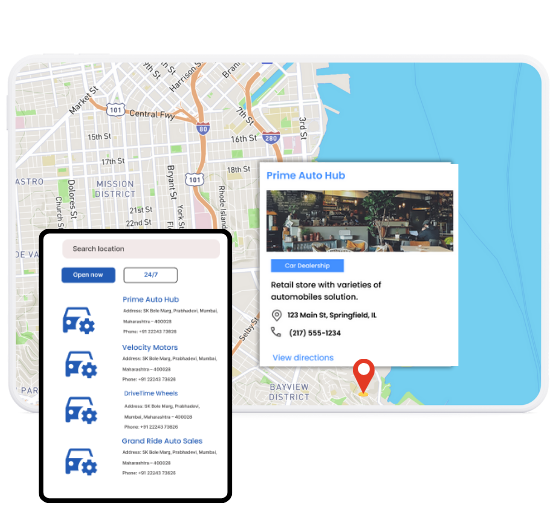
Top Features for Auto Dealership Maps
Our WordPress map plugin offers powerful, flexible, and highly customizable features.
Dealer Type Filters
Let users toggle between service centers, showrooms, or authorized dealers easily.
Brand-Specific Icons
Use category-based icons to visually separate different dealer types.
Location Details & Directions
Each listing provides address, contact info, and direction links to the location.
Live Status Indicators
Only show dealerships that are currently open to visitors.
Bulk CSV Import
Upload hundreds of locations quickly with our spreadsheet-friendly import system.
Responsive & Mobile Friendly
Maps and listings adjust perfectly across phones, tablets, and desktops.
Custom Fields for Car Brands
Add tags for brands sold or services provided, such as Honda, Toyota, or EV support.
List + Map Integration
Combine interactive maps with searchable dealer listings below.
Gutenberg & Elementor Ready
Use native WordPress editors to place your car locator anywhere easily.
Why Choose WP Maps Pro?
WP Maps Pro helps auto brands and dealership networks connect with buyers through smart, searchable maps that drive foot traffic and visibility.
- Visualize car dealerships, service centers, and showrooms on a map
- Let customers filter by brand, service type, or open status
- Add dealership contact info, hours, and directions
- Easily embed maps in landing pages or dealer portals
- Show real-time open/closed status with filters
- Use custom icons and brand imagery for better UX
- Great for car brands, used car networks, or local garage directories
- Import up to 10,000 listings with our bulk CSV tool
- Highly customizable with shortcodes and hooks
- Mobile-ready for on-the-go customers
- SEO-friendly architecture helps index all dealers
- Supports geolocation and user proximity search
Live Map Demo
How to Use WP Maps Pro
Follow these simple steps to get started.
Collect Dealer Information
Gather dealer addresses, contact details, hours, and categories like showroom or service center.
Import with CSV
Use the plugin’s bulk importer to upload all your dealership listings at once.
Create Your Map
Choose provider, icons, filters, and zoom levels to tailor your dealership locator.
Add to Website
Paste the shortcode into your dealer locator page or use Gutenberg to embed the map block.
Frequently Asked Questions
Find answers to common questions about Store Locator Plus
Yes, use categories such as Authorized Dealer, Service Center, or Showroom for easy filtering.
Simply upload your list via CSV and map fields like address, phone, and category.
Yes, WP Maps Pro supports geolocation-based proximity searches out of the box.
Absolutely. Assign custom icons to differentiate between showroom, service, or dealers.
Yes, you can use it inside Elementor, WPBakery, or Gutenberg without any extra steps.


Build Customizable Maps Now
Create interactive maps with WP MAPS PRO, the top Store Locator Plugin. Try free and unlock all features!