
Find the Best Bookstores in Your Area
List and map independent bookstores, retail chains, and specialty bookshops by genre or location.
Explore Bookstore Demo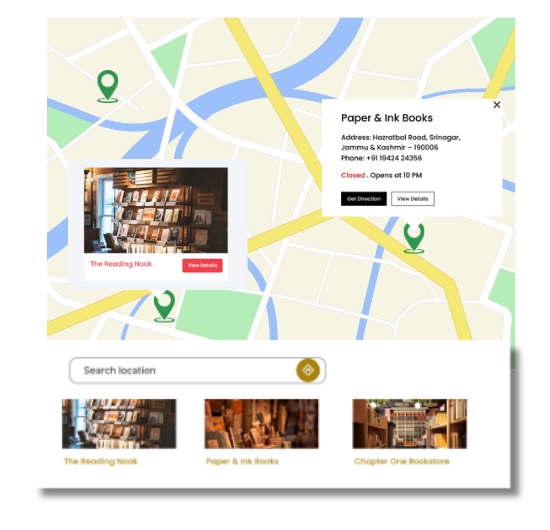
Key Features for Bookstore Maps
Our WordPress map plugin offers powerful, flexible, and highly customizable features.
Support Local & Chain Stores
Promote both independent bookstores and popular retail brands.
Genre-Based Filters
Let visitors filter by fiction, non-fiction, kids, comics, or rare collections.
Display Hours & Address
Show when stores are open and how to reach them with full contact details.
Mobile & SEO Friendly
Fully responsive design with SEO-optimized listings and schema support.
Use Custom Icons
Highlight stores with icons like books, open books, or bookmarks.
Shortcode Placement
Embed your bookstore locator anywhere on the site using shortcodes.
Import via CSV
Upload multiple bookstore listings at once using an Excel or CSV file.
City & Category Filters
Allow filtering by city, category, or open status to improve UX.
Add Tags for Specialties
Mark stores that offer used books, events, or cafés with tags.
Why Choose WP Maps Pro?
Connecting readers to the right bookstores is easy with WP Maps Pro. Whether it's a neighborhood indie shop or a national bookstore chain, this map makes your listings searchable, organized, and visually appealing.
- Create a bookstore directory with smart filters
- Allow genre and category sorting like Comics, Kids, Sci-Fi, etc.
- Support both local stores and national chains
- Mobile-optimized display and fast loading
- Add working hours, addresses, and images
- Use icons like books, pens, or authors
- Enable CSV-based bulk uploads
- Integrate seamlessly with your WordPress theme
- Boost SEO with schema-ready map pages
- Flexible shortcode placement for any page
- Make it easier for readers to find you
- Customize listings for events and offers
Live Map Demo
How to Use WP Maps Pro
Follow these simple steps to get started.
Add Bookstore Categories
Create categories like Fiction, Kids, Used, and Café Bookshops.
Upload Store Listings
Manually or via CSV, input name, genre, address, and open hours.
Design Your Locator
Use book-themed icons and choose map layout and center.
Publish the Map
Embed your bookstore locator using the shortcode provided.
Frequently Asked Questions
Find answers to common questions about Store Locator Plus
Yes, the plugin supports both and allows organizing by category or tag.
Absolutely. You can define custom categories like Comics, Rare Books, or Academic.
Yes. Each map page is optimized with schema markup for better visibility.
There’s no limit — add dozens or thousands with bulk CSV upload.
Yes! You can upload your own SVG or image icons for each category.


Build Customizable Maps Now
Create interactive maps with WP MAPS PRO, the top Store Locator Plugin. Try free and unlock all features!