
Add a Barber Shop Locator to Your WordPress Site
Help users find top-rated barbers, grooming salons, and haircut specialists nearby.
Explore Live Demo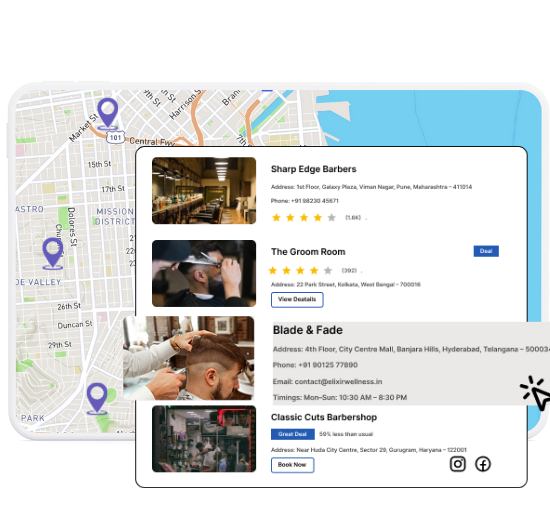
Essential Features for Barber Locators
Our WordPress map plugin offers powerful, flexible, and highly customizable features.
Location Search
Allow visitors to find barbers by city, zip code, or current location.
Service Categories
Filter listings by service types like beard trim, haircut, or grooming.
Working Hours Display
Show shop hours to let users know when it’s open for walk-ins.
Mobile Optimized
Perfect experience on mobile for users on the go.
Image Thumbnails
Add shop or stylist photos to boost trust and visual appeal.
Click-to-Call
Let users book appointments or call directly from the map.
Instant Directions
Turn-by-turn navigation with Google Maps integration.
Custom Icons
Use clipper, razor, or beard icons to represent barber types.
Listing + Map Layout
Display barber info both on map pins and in list view.
Why Choose WP Maps Pro?
Beard trims, fresh fades, or full-service cuts—your site should guide users to the right grooming spot fast.
- Organize barbers by specialty: cut, trim, shave
- Geo-search makes finding the closest barber easy
- Easy-to-read icons help customers pick the right service
- Import dozens of shops instantly via CSV
- Filter locations by availability and service type
- Match your brand with map styling and icons
- Seamless shortcode placement on any page
- Boost SEO with geo-targeted content
- Mobile ready for quick haircut lookups
- Perfect for franchises or local shops
- Add phone numbers for quick appointment booking
- Flexible, scalable, and blazing fast
Live Map Demo
How to Use WP Maps Pro
Follow these simple steps to get started.
Create Categories for Barber Services
Define services like haircuts, beard grooming, or shaves.
Add or Import Shop Data
Enter addresses, phone numbers, and hours manually or via CSV.
Customize Your Locator
Add icons, filters, and configure the display with WP Maps Pro settings.
Publish the Map on Your Website
Embed it with a shortcode on any page, post, or builder section.
Frequently Asked Questions
Find answers to common questions about Store Locator Plus
Yes, you can list solo barbers, multi-seat shops, or franchise branches.
Yes! Users can see barbers closest to them automatically.
Use the built-in CSV importer to upload dozens of shops in seconds.
Absolutely. Each listing supports hours, phone, address, and service info.
Yes, WP Maps Pro is fully responsive and touch-optimized.


Build Customizable Maps Now
Create interactive maps with WP MAPS PRO, the top Store Locator Plugin. Try free and unlock all features!