
Add a Bank & ATM Locator to Your WordPress Site
Let users easily find the nearest bank branches and ATMs with smart filtering and live direction support.
Explore the Demo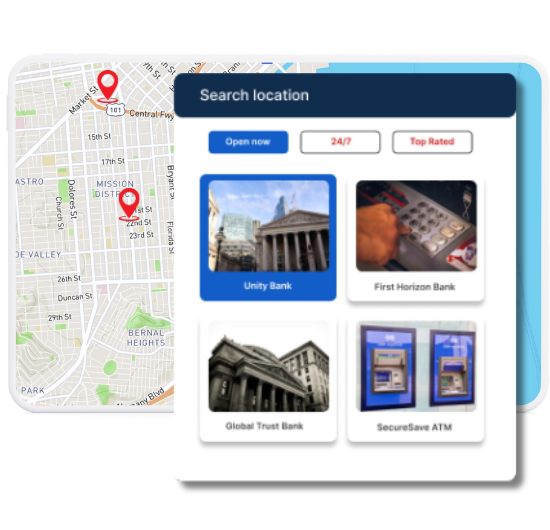
Top Features for Banking & ATM Maps
Our WordPress map plugin offers powerful, flexible, and highly customizable features.
ATM & Branch Filters
Users can toggle between ATMs and full-service bank locations for fast access.
Live Directions
Each pin includes a one-click direction link powered by Google Maps.
Open 24/7 Labels
ATMs are highlighted with round-the-clock availability labels.
Category-Based Icons
Differentiate between services using intuitive icons.
Geolocation Support
Show nearby facilities based on user’s current location.
Mobile Optimized UI
Optimized for smartphones and tablets, ideal for banking on the go.
Data Import Ready
Quickly upload hundreds of ATM or branch records via CSV.
Custom Fields
Add extra info like wheelchair access, drive-through availability, or banking hours.
Multi-City Coverage
Perfect for national or regional banks with branches in many locations.
Why Choose WP Maps Pro?
Whether you're a local credit union or national bank, WP Maps Pro helps customers locate financial services in seconds.
- Plot ATMs and bank branches with real-time filtering
- Highlight open/closed status instantly
- Allow users to search by city, zip, or category
- Use geolocation to auto-detect nearest facility
- Add custom fields like lobby hours, drive-through access, and wheelchair support
- Import bulk location data with a spreadsheet
- Customize marker icons to match your brand
- Provide instant directions with one tap
- Support multilanguage needs for wider reach
- Compatible with all WordPress page builders
- Show map and directory side-by-side
- Secure and performance-optimized
Live Map Demo
How to Use WP Maps Pro
Follow these simple steps to get started.
Prepare Your Facility Data
List each ATM or branch with name, address, hours, and category (ATM or Branch).
Upload Using CSV Import
Import multiple locations at once through the plugin’s bulk uploader.
Design Your Map
Choose zoom level, icons, and optional filters to match your site branding.
Embed on Website
Copy the shortcode and paste into any page, or drop it into a builder block.
Frequently Asked Questions
Find answers to common questions about Store Locator Plus
Yes, you can categorize your locations and let users filter by type (ATM or Bank Branch).
Absolutely. Each location can include open hours and be filtered by current status.
Yes, the plugin includes geolocation support to suggest nearby facilities.
Use the CSV import tool to upload all your facility records with address and category tags.
Yes, you can upload custom icons to visually distinguish ATMs from full-service banks.


Build Customizable Maps Now
Create interactive maps with WP MAPS PRO, the top Store Locator Plugin. Try free and unlock all features!